MotionStudio.
A real video editor, right in your browser.
Think of it as Canva for programmatic video. You drop text, images, video, audio and animated backgrounds onto a canvas, arrange them on a timeline, animate them, and export a real MP4 — all without leaving the browser. It's built on Remotion, so what you see while editing is what actually renders. This page is my living build journal: what it does, the decisions behind it, and the bugs that taught me something.
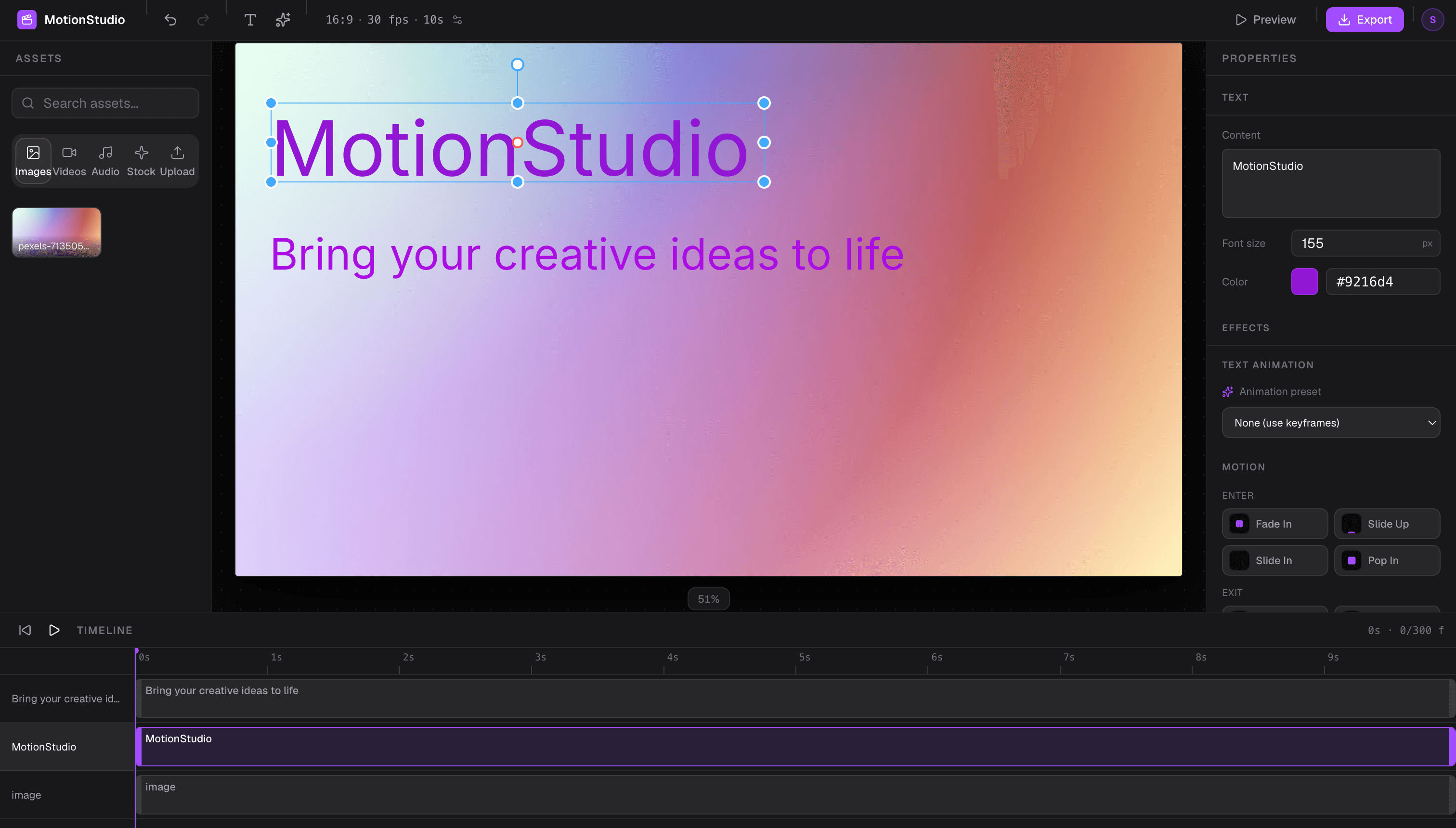
A full editor, no install required.
Drag, resize, rotate and edit text, images, video and audio right on the frame — the way you'd expect any editor to work.
Keyframe opacity, position, scale and rotation, or grab one of 34 ready-made text effects and 18 animated backgrounds. Every one previews live before you commit.
21 ready-made templates — announcements, product demos, hooks, title cards. Pick one and you've got an animated video in three clicks instead of twenty.
Drop in a track and it finds the beat, then your shots snap to it — so cuts land on the music instead of you eyeballing it.
Render for free right in your browser, or send it to the cloud for full-fidelity 1080p from any device — even your phone.
Google, email, or jump in as a guest. Signed-in projects auto-save to the cloud and come back on any device you log into.
A hands-on quick start walks you through your first video, and a hover-anywhere helper mode explains any control — without ever blocking a click.
Why Remotion is the core bet
The whole product hinges on one thing: it renders real video. Remotion gives me frames as a first-class unit, <Sequence> for laying things out in time, <Player> for the in-app preview, and a real render pipeline — building a renderer and encoder from scratch would be months of work that teaches nothing about this product. So I bought that, and spent my time on everything built on top of it:
Frames, not seconds — every element carries a `startFrame` and `durationInFrames`, mapped 1:1 onto `<Sequence from={startFrame}>`. Frames because Remotion is frame-based and frames are exact — no floating-point drift creeping into your timing.
One renderer for the preview and the cloud — the editor canvas renders the *same* `MotionComposition` through a Remotion `<Player>`, with drag/resize as a transparent overlay on top. The editor preview and the AWS Lambda render run the identical component tree, so what you see is genuinely what the cloud renders. (The free in-browser export is a separate, faster path — see below.)
Effects bought as source, not built — 34 Remocn text-effect components (per-character rise, typewriter, glitch, shimmer, counting numbers…), 18 frame-synced WebGL shader backgrounds, and 4 structured UI blocks (terminal, code editor, progress steps, confetti) as a 6th element type. Each is vendored into the repo and lazy-loaded per preset, so I own the code but didn't write the polish.
Animation on Remotion's primitives — `interpolate` with `extrapolate: 'clamp'` so animations *finish* instead of running off to infinity, and `spring` for real physics (it needs `fps`, because a bounce happens in real time). Stack several on one element and they accumulate — scale factors multiply, offsets add — the same algebra a compositor uses.
DOM video for scrubbing, Remotion for the truth — the editor previews with a plain `<video>` (seek on scrub for exact frames, play natively during playback, muted for reliable autoplay); the export uses `<OffthreadVideo>`, which is authoritative.
The export pivot — from a CLI command to two real paths
The first version of export was a Remotion CLI command the app generated for you. It worked — if you were a developer happy to run a terminal command. For an actual end user, unusable. That gap is the real story: the missing piece wasn't a feature, it was a way for normal people to get a finished video out. So it became two paths, each with an honest trade-off.
Browser export (WebCodecs)
Renders entirely inside your browser — no server, no terminal. Each frame is drawn to an off-screen canvas, audio is mixed sample-exact with OfflineAudioContext, and the browser's hardware encoder (WebCodecs / H.264) compresses it, muxed to MP4 with Mediabunny and downloaded straight to your device. Zero infrastructure cost. There's a beta 'Include effects' mode that renders the real composition so text effects, shaders and blocks survive — it's ticked automatically when your project needs it.
Free, instant, private, and it works offline. The plain path is fast and dependable; the beta effects path closes most of the fidelity gap without a round-trip to a server.
Limits: Chrome and Edge only (WebCodecs isn't in Safari yet). The fast path draws to a 2D canvas, so it drops the 34 text effects, animated backgrounds and blocks unless you turn on the slower 'Include effects' mode — and the dialog warns you when your project needs it.
Cloud render (Remotion Lambda)
Click Render in the Cloud tab and a Vercel function verifies your login, checks your monthly quota in Supabase, and kicks off a Remotion Lambda render on AWS. It returns immediately with a render ID; the browser polls for progress, so you get a real percentage instead of a spinner, and the render is never silently capped by a serverless timeout. Media you imported is uploaded to S3 in the background, so Lambda has real URLs to fetch. Out comes a 1080p MP4.
This is the path that just works — on every device, including Safari and phones, and with every effect, shader and block intact because it runs the exact same composition as the editor. The render happens on dedicated infrastructure, not your laptop.
Limits: Quota-based — Lambda costs real money, so guests get 1 free render and signed-in users get a monthly allowance.
The honest bit: 'what you see is what you get' holds for the editor preview and the cloud render — they're the same component tree. It does not fully hold for the fast browser export, which paints to a 2D canvas and can't draw React-rendered effects. Rather than pretend otherwise, the export dialog inspects your project and warns you, and the beta effects path exists to close the gap. Being upfront about the seam beat quietly shipping a broken file.
Each frame is painted to an off-screen canvas using the exact same function the editor preview uses. WYSIWYG is a mathematical consequence, not a design goal.
Each frame's ImageData is pushed into a VideoEncoder. WebCodecs uses the device's hardware encoder — no plugin, no server, no round-trip.
All audio tracks are mixed into a precise AudioBuffer — no timing drift, no desync risk from real-time mixing.
Encoded chunks and audio are muxed into an MP4. The finished blob downloads directly to the user's device. No server.
Client posts project state + device ID. Four gates run in order — nothing reaches Lambda until all pass.
Pre-deployed Lambda renders the same MotionComposition in headless Node.js — same composition, AWS infrastructure.
Lambda writes the MP4 to S3. The Vercel function polls getRenderProgress() until done, then returns the URL to the client.
Both paths render the same MotionComposition component — the browser encodes frames locally, Lambda renders them in headless Node.js.
Auth, quota, and keeping guests honest
Three ways in — Google, email/password, or anonymous guest with no sign-up at all. All of it lives behind a single useAuth hook, so no UI component ever touches the Supabase client directly. The interesting engineering isn't the login button; it's making a free cloud render abuse-resistant and keeping people's projects from bleeding into each other on a shared computer.
Keeping guests honest
Guests get 1 free cloud render — and the obvious cheat is to clear localStorage and get another. So the free slot is tracked by a **device ID cookie** (a `crypto.randomUUID()` in a 1-year cookie) that survives a localStorage wipe. The slot is only spent **after a confirmed successful render**, so a failed or abandoned render never burns your one free try.
The API layer
Four small Vercel functions sit between the browser and AWS — `/api/render`, `/api/quota`, `/api/upload-url`, `/api/contact`. Every render runs a **4-gate guard, strictly in order**: verify the login → check the device (guests only) → check the monthly quota → *then* start Lambda. And because a render can outlast a serverless request, `/api/render` returns a render ID immediately and the client polls a status endpoint — which is what removed the silent ~60s timeout cap and gave the progress bar real numbers.
Account isolation
Projects live locally in IndexedDB. On any auth change, a tiny non-rendering AuthBridge compares the new user to the last one and, if it's different (or a sign-out), wipes the local store and IndexedDB. User B never opens their laptop to find User A's projects sitting there.
Frames, <Sequence>, <Player>, and real Lambda rendering — the video engine, and the one dependency the whole product is built around.
Elements are a discriminated union, so adding a new element type is one type plus one renderer — the compiler tells you everything you forgot.
Global state with zero boilerplate: one create() gives a hook and selectors. No providers, no reducers.
/ is the dashboard, /editor/:projectId is the editor — the URL is the single input that picks a project.
Drag/resize/rotate handles are a solved problem; rebuilding them is weeks of hit-testing math that teaches nothing about this product.
34 copy-paste Remotion text effects, 18 WebGL shader backgrounds and 4 UI blocks — animation polish vendored as source and lazy-loaded per preset, not built from scratch.
Fast, consistent dark UI from design tokens, plus accessible primitives (Dialog, Popover, Select) I didn't have to reinvent.
Local persistence split by shape: small JSON state in localStorage, large media blobs in IndexedDB (which is built for Blobs).
Auth (Google / email / guest) + Postgres with row-level security for render quotas and per-user project sync (a JSONB row, 2s-debounced) — no auth server to build or run.
Four Node endpoints (render, quota, upload-url, contact) deployed alongside the SPA — zero standing infrastructure for that footprint.
The cloud render path: headless render on Lambda, output and media stored in S3. A cloud pipeline for ~20 minutes of config instead of months of infra.
Search and import free stock photos/video straight into a project — proxied through a server function, auth-gated.
Product analytics and unhandled-exception capture tagged with the build SHA. Signed-in users are identified by their stable Supabase UUID (not email, which can change); guests stay anonymous.
The guided quick start and the hover-anywhere helper mode — spotlighting and positioning that don't require any of the 21 explained controls to know onboarding exists.
Two layers, one rule
engines/   own DATA + LOGIC   (no UI)
features/  own UI             (compose engines)
The whole thing rests on one rule: the Project is the aggregate root. One Project object owns all the data — every element, asset and setting. Engines don't keep their own copies; they expose verbs that read and write the one Project through a single mutation point (updateProject). Everything good falls out of that: undo/redo hooks that one point and covers every edit for free, autosave persists the one Project with nothing wired per-feature, and state can't drift because there's only ever one source of truth.
The three data moves — immutability everywhere
add     → [...arr, x]
remove  → arr.filter(x => x.id !== id)
update  → arr.map(x => x.id === id ? { ...x, ...patch } : x)
React and Zustand detect change by reference identity, and undo snapshots have to stay frozen. A single .push() would skip re-renders and quietly corrupt the undo history.
Some engines are stores and some are hooks, on purpose. A store owns state (Project, Editor). A hook owns verbs over state it doesn't hold — Canvas and Asset read the active project and write it back through updateProject. Keeping element data on the Project, not scattered in the Canvas engine, is the aggregate-root rule actually enforced in code.
Composition-space coordinates
Coordinates are stored once, in the real output resolution (1920×1080), never in screen pixels — the editor just shows a scaled-down view. That's why the export always matches the editor: every view (editor at ~50%, the render at 100%) just multiplies by its own scale. This one conversion powers canvas dragging, drop-to-canvas, and scrubbing.
data → screen : × scale   (shrink to fit the window)
screen → data : ÷ scale   (grow a drag back to real coords)
Timeline coordinate math
Same idea, on the time axis. Retiming a clip by dragging it is `updateElement(id, { startFrame })` — the exact same verb as dragging it on the canvas, through the exact same door.
pxPerFrame  = trackWidth / totalFrames
frameToX(f) = f × pxPerFrame          (draw a clip / ruler tick)
xToFrame(x) = round(x / pxPerFrame)   (scrub / drag)
Time-based playback clock
Playback advances by real elapsed time × fps, not `currentFrame++` per frame. `requestAnimationFrame` fires at the monitor's rate — 60 or 120Hz, and it drops under load — so counting frames would play 30fps content at 60fps on a 60Hz screen. Measuring wall-clock time keeps the speed correct on any hardware.
Animation engine — accumulate, don't replace
Built on Remotion's interpolate (clamped so animations finish instead of running to infinity) and spring (real physics, which needs fps because a bounce is real-time). The key call: multiple animations on one element accumulate into a single transform — scale factors multiply, position offsets add — the same algebra a compositor uses. That's why Fade In and Slide Up stack cleanly instead of one clobbering the other.
value  = base × Π(scaleFactors) + Σ(offsets)
finish = extrapolate:'clamp'   (no infinite extrapolation)
Persistence, split by data shape
Object URLs die on reload, so I persist the raw bytes and mint a fresh URL each session. localStorage can't hold large binaries; IndexedDB is built for Blobs. Signed in, projects also sync to Supabase: on login the cloud copy is the source of truth, and a 2s-debounced upsert pushes each project as a JSONB row (scoped per user). Because everything is one Project object, cloud sync was one table and about 40 lines.
metadata (JSON, small)  → localStorage (Zustand persist) + Supabase (cloud, per user)
media bytes (binary)    → IndexedDB (local) + S3 (public URL for Lambda)
Undo/redo — snapshots + coalescing
History is snapshots of the projects array. Because edits build new objects immutably, snapshots share the unchanged sub-objects — cheap, no deep copies. Rapid edits within ~500ms coalesce into one step, so a whole drag or a typing burst is a single undo. It was nearly free to build, because every edit already flows through updateProject.
Shots — a label on time, not a box around it
A video is a sequence of shots, and the timeline needs to say so. The obvious model is nested `scene.elements[]` — but I didn't do that. The render contract is a **flat array with absolute startFrames**, and nesting would force every consumer (the exporter, the web renderer, the audio mix, the Lambda site) to flatten first — the code least worth destabilising. So elements stay flat and just gain a `sceneId`, and a shot becomes a labelled span of time. Not one line of the render path changed. The price is that two invariants (an element lies inside its shot; the total equals the sum of shots) are enforced in ~20 lines of pure, tested code instead of falling out of the shape — a deliberate trade, because a render-path regression is the failure mode this codebase has been bitten by most.
Beat detection — infer a grid, don't report the onsets
Cutting to music is the point of shots, and the naive build — detect each onset, draw a tick, snap to it — is wrong. Onset detection is jittery, and a jittery grid is worse than none: a clip lands two frames off and you can't tell if that was you or the tool. So the peaks are only ever *evidence* for two numbers — **BPM and first-beat offset** — and the grid drawn from them is perfectly regular, more accurate than the detections it came from, and survives passages with no kick. Everything's kept in seconds and converted to frames only at the moment of snapping, because a grid stored in frames drifts a couple of frames out by beat 32 — fine in a five-second test, broken in a real edit.
Transitions are just animations
A transition *is* an animation — a zoom punch is `scale 1.18 → 1`, a whip is `x +768 → 0`. The animation evaluator is already called by both the Remotion renderer and the browser export, so materialising a shot's transition as animations on its elements means it renders and exports everywhere with nothing else changing — the same trick that kept shots and beat-snapping cheap. A `source: 'transition'` tag keeps the generated ones out of the Motion panel and lets them be swapped without touching anything hand-made. The cost, accepted on purpose: no true cross-dissolve, because shots never overlap.
One editor per project, across tabs
Both persistence paths serialise the whole projects array, and neither reconciles — so a second tab holding a stale copy silently overwrote the first tab's work, and last-writer-won never told the loser. Merging concurrent edits to a video has no obvious right answer, so I chose a **lock, not a merge**: a per-project claim in localStorage (synchronous, and its `storage` event fires in *other* tabs — exactly who needs to know). Claims expire after 75s (a crashed tab never releases, and Chrome clamps background timers to ~once a minute, so a shorter window evicted every backgrounded tab). The guard sits on `updateProject` — the one chokepoint — plus undo/redo, which restore the whole array.
Blocks — a registry, not another hardcoded union
Text effects and shaders are string unions with a lazy map — fine for 'one component, one string,' but useless for components that take arrays and objects (a terminal's lines, a pipeline's steps). Those became a 6th element type backed by a **registry**: each entry declares its lazy import, defaults, natural length, a field schema the Properties panel renders inputs from, and a `toProps` translator. Adding a block is a registry entry — the renderer and the panel don't change. Two things the registry also owns: composition-scale sizing (a component tuned for someone else's canvas can render at 1.4% of the frame), and enforcing each block's natural length so a too-short clip doesn't cut the animation off.
The app reports its own bugs
A tool people actually use needs a way to tell you when it breaks — so there's an **in-app feedback form** that auto-attaches the build SHA, browser, screen size and (in the editor) the current project's format and contents, and you can read exactly what's attached before you hit send. Every failure surface — a failed export, a failed cloud render, a file that needs re-uploading — carries a **"Report this"** link that opens that form with the problem already described. And a once-per-release **"What's new"** dialog (with a dot on the ? button until you read it) keeps people in the loop without nagging. It's the difference between a demo and something you can hand to a stranger.
Schema migrations that travel with the data
Zustand's persist has a version, but it only covers IndexedDB — a project pushed to Supabase and pulled back down arrives as a bare object with no version anywhere on it, so the cloud path could only run the migration and hope. So the version lives on the Project itself (`schemaVersion`), and `migrateProject()` walks a ladder of steps and stamps the result — even when no step ran, because saying 'this is version 1' is what lets the next migration skip it. It runs at all three entry points (IndexedDB restore, cloud load, template create), and a project from a *newer* build is detected and left untouched rather than stamped backwards.
Problems faced, and how they fell.
Every cloud render crashed with a raw "supabaseUrl is required." on every single frame — while the browser app worked fine. The render entry imported a helper from a barrel file that also re-exported the cloud-sync module, which built a Supabase client at module top-level. Remotion's bundler doesn't swap Vite's env syntax, so the URL came through undefined in the Lambda bundle and threw before a frame rendered.
Made the client a lazy getSupabase() instead of an eager top-level singleton, so importing the module (even transitively, via a barrel) no longer has a side effect. Lesson: a top-level createClient() in any file a render entry can reach is a landmine — the render bundle is not the app bundle.
Fixing the code didn't fix the render. After the lazy-client fix shipped to Vercel, cloud renders still failed with the identical error.
The Lambda-executed bundle is a separate artifact in S3 that a Vercel deploy never rebuilds. Added `npm run deploy:lambda-site` and ran it to push the fixed bundle. Any change reachable from the render entry needs that command re-run, or the cloud keeps executing the old bundle while the rest of the app looks fully deployed.
Every text effect silently rendered in Times New Roman. The vendored Remocn components set `font-family: var(--font-geist-sans), …, sans-serif` — but that variable ships with Remocn's own Next.js setup, not mine, and CSS throws away the entire declaration when a var() is undefined, sans-serif fallback and all.
Defined the variable once on the composition's root — the one component mounted by both the editor preview and the render, so they stay identical. Found by rendering a frame through the CLI and looking at it: 'no error' is not 'correct.'
Cloud project sync silently never worked — the table didn't exist. The sync code was written correctly against a projects table that was never actually created in Supabase, and every failure only reached console.error, so the UI showed nothing. A new browser just always looked empty.
Created the table with RLS and an explicit GRANT (this project's public schema didn't have the default grants). The real lesson took two goes: a console.error on a persistence path is invisible until someone goes looking, so saveProject now returns a result the toolbar actually shows.
A prop-name mismatch silently ate a color. Every text effect gets a shared { text, fontSize, color, speed } object, but one effect declared its prop as baseColor — so color was passed, matched nothing, and was dropped with no TypeScript error (mismatched props on a spread aren't checked the way an object literal is).
Renamed the prop to color to match the shared shape every other effect already uses.
Omit on a discriminated union silently collapses to common fields — updateElement lost content, assetId, and friends with no error.
An ElementPatch type: the intersection of per-member partials, so every field of every union member is patchable.
Remotion's <Composition> inferred props as unknown. An interface isn't assignable to Record<string, unknown> — it could be augmented later; a type alias is.
Changed interface ExportProps to type ExportProps. One keyword, fixed inference.
contenteditable cursor jumped to the start on every keystroke — React re-rendering the element reset the DOM selection.
Set initial text via a ref on mount only, then let onInput push to the store without React re-writing the node.
react-moveable under a scaled canvas: element coords are composition-space but the stage is scaled, so handles and elements disagreed.
Drive drag/resize with client-pixel deltas ÷ scale, committing composition coords on release.
Layer reorder did nothing. The first attempt shuffled array order — but stacking is driven by zIndex, not array order.
Rewrote it to reassign contiguous zIndex values.
Undo stepped pixel-by-pixel — a clip drag commits on every pointer-move, so one drag became dozens of undo steps.
Time-based coalescing groups edits within ~500ms into one history step, so a whole drag (or a typing burst) is a single undo.
Undo restored dead blob: URLs — asset rehydration went through updateProject and entered history.
Rehydration became a silent update ({ history: false }).
blob: URLs can't be rendered in Node/Lambda — browser-only object URLs are meaningless to a headless renderer on AWS, so cloud renders came out with missing media.
Assets upload to S3 in the background at import (presigned PUT), the asset is patched with a public storageUrl, and the export remaps blob: → storageUrl before invoking Lambda. The browser keeps the blob: URL for instant local preview.
shadcn's CLI wrote generated components to a stray root @/ folder instead of src/.
The root tsconfig.json was missing paths — added it so @/ resolves to src/.
White-on-white text: default text color was #ffffff on a white canvas. Invisible, and no error anywhere.
A default that contrasts with the canvas — and another reminder that "no crash" ≠ "correct."
supabase-js .throwOnError() returned an error object with an empty message string — impossible to debug.
Replaced it with a direct fetch() to the Supabase REST API with explicit headers. Same query, raw HTTP, returned the actual error. The abstraction was hiding the signal.
Supabase's new sb_secret_ key format caused 403s on the renders table even with the correct key value.
Switched back to the older JWT-format keys from the dashboard — the new format wasn't compatible with the supabase-js version in use.
Remotion version drift broke Lambda — client at 4.0.483, Lambda at 4.0.488 failed at invoke time.
Pinned all Remotion packages to one exact version (removed the ^). They must match exactly across the tree.
RLS blocked even the service_role key from inserting into the renders table, though service_role is supposed to bypass RLS.
The table was created with grants off, so service_role had none. An explicit GRANT … TO service_role fixed it.
- ▹The fast browser export draws to a 2D canvas, so it drops text effects, shaders and blocks — there's a beta mode that keeps them, and the dialog warns you when your project needs it; the cloud render always has everything.
- ▹Browser export needs Chrome or Edge (WebCodecs isn't in Safari yet); the cloud render covers every other device.
- ▹Editor audio/video preview is muted and autoplay-dependent; the export is authoritative for sound and timing.
- ▹Dashboard and editor are desktop-only (≥1024px) — below that a gate shows a "use a bigger screen" message; the landing page and sign-in stay fully responsive, so you can still sign up on a phone.
- ▹Media mostly follows you across devices — uploads sync to S3 in the background and the editor falls back to that copy — but a file whose upload never finished stays on the machine you added it from.
- ▹No scene grouping yet (moving several elements as one unit) — sequencing is done by positioning clips on the timeline.
- ▹Tests cover the pure engines (scenes, beat detection, migrations, scale…), where the expensive-to-get-wrong logic lives; the React panels lean on typecheck + lint rather than component tests.
A single mutation path is a superpower — it's what made undo, autosave, and WYSIWYG cheap. Decide *where* data changes before deciding *how*.
Store data in the target domain (output resolution, frames), not the view's units — views come and go, the data shouldn't.
"No error" isn't "correct" — white-on-white text, the silent Omit-on-union, and every effect rendering as Times all shipped zero warnings.
Buy the boring parts (moveable handles, encoding, Lambda rendering) and build the parts that are actually your product: the composition model, the timeline, the animation system.
The CLI export was always the wrong tool for real users — they can't run terminal commands. The gap wasn't a missing feature; it was a missing way to get a finished video out.
Never trust the client — verify the login server-side first, then the abuse checks, then spend money. Always in that order.
Abstractions that hide errors are worse than no abstraction — a swallowed error string sent me down a two-hour path a raw HTTP call answered in ten seconds.
Be honest about the seams. The browser export doesn't match the editor perfectly, so the app says so — a warned limitation beats a silent broken file.